I have an old MacBook Pro, a mid-2010 model running Sierra OS X, or macOS Sierra as it’s now apparently known. Naturally an 8-year-old laptop has been slowing down, giving me small problems for years.
A few days ago I arrived at the place I knew we were going, and no finally arguing with it: my MacBook Pro won’t turn on…. It was stuck at the screen with the Apple logo and the progress bar or loading bar right beneath it. Soft resets, hard resets, no matter what I tried the progress bar would stop about halfway through, maybe two thirds of the way. It had been booting up slowly for years—five or ten minutes to start–and it was getting worse, as these things do.
TL;DR:
The slow performance I’d been putting up with, figuring the problem was my eight-year old hardware, clearly has been something other than a hardware problem. I though I had an old computer that was on its last legs. This MacBook Pro could die tomorrow, but clearly it is still better hardware that I assumed. I would not have ever know this unless I applied the following fix……
Naturally this happened when I was getting my main computer fixed, and long story short I needed a computer to get things done asap. This is the story of what I did to fix my old MacBook Pro (I write this in mid-2018), but before I get going, fair warning: this might not be a solution for you. You’ll see what I mean below.
Because nothing I read as I searched for a solution for the progress bar stopping recommended this as a fix in my situation. But I will say this: I’m happy I used the following solution.
Google pointed me straight to the Apple forums and suggestions on what to do, but these had limited value for me. There are several macOS Recovery key combinations you can use to get into an OS X or masOS utilities window that gives you diagnostic options for this situation. Check this out:
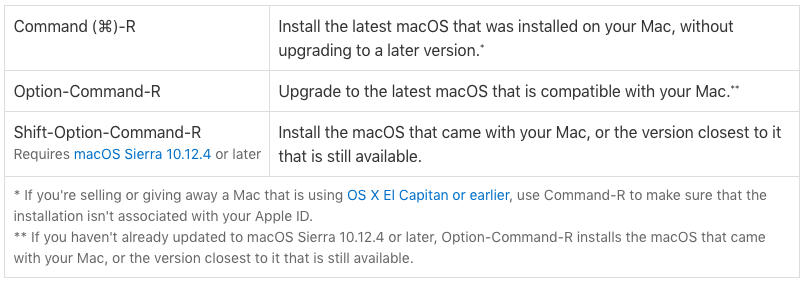
Now I had a hard time even getting to macOS Utilities window. I kept on trying, feeling like a dummy. Most times the progress bar just stopped, but I noticed it stopped at slightly different points several times.
Finally I did get thru–and I did nothing differently; I wish I could tell you why it worked that time. At the macOS Utilities window the first thing I did was to try to repair the disk. It showed no issues with the hard drive, which gave me some hope. (I knew from experience that Apple is not shy about telling you that you need a new hard disk when you run Disk Utility!)
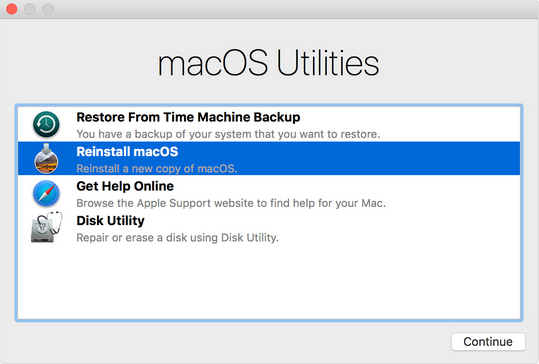
But each time, when I booted up again, I was looking again at the same stuck progress bar.
On my phone I looked for clues in the Apple Support forums naturally. Some people said they’d fixed the problem by doing what I’d done. You wonder what the other Mac users ended up doing.
Next step: reinstall OS X? It is possible to reinstall OS X/macOS—it’s called an install in place–without losing your data, apps, etc. I tried this, it took an hour or so, just long enough for me to build up some hope that his would work and let me avoid more expensive solutions in terms of both money and time.
I’m living in Bali, Indonesia, where there aren’t yet any official Apple Stores, though there are a shops with Apple logos on them and people who will encourage you to bring your computer to them for a look. Most of these techs mean well I think, but still I avoid this situation.
When the fresh operating system install in place was done I rebooted and….yeah. Same result as before. By now I had hours into this and began to feel tempted by a last ditch solution.
Yep, I’m talking about wiping the hard drive—I mean delete the data and the operating system, and eight years of lord-knows-what-stuff might have compromised the drive–assuming of course that the problem was something other than old hardware.
I was getting the sinking feeling that it was in fact the age of the hard drive or something else hardware-related, and in a way that gave me a ‘nothing to lose’ feeling.
Let’s back up though: why was completely wiping the hard drive such a big deal for me?
So here’s where I admit to one of my many character defects.
I had no Time Machine backup.
In fact, no backup of this hard drive at all. So, mea culpa. All my fault.
If you’re reading this and you do have a backup, you will probably want to try going back to a point to where things were working, restore from that point and see if that fixes your problem (disclaimer: I’m not a hardware tech nor a genius of any kind, Mac or otherwise).
Here’s the part of my solution you might find controversial, or even a 100% no-go. Again, if you live near an Apple Store you’ll want to go see them for advice at this point–I would have, but again it wasn’t an option for me.
So I decided to try a fresh reinstall of OS X that also would wipe the entire hard drive, deleting several years of data and putting the computer back at its original state.
In some ways this wasn’t a huge deal for me. Most of what I really care about (personal images, video, docs, etc) are backed up in the Cloud somewhere, places like iCloud, Google Drive, Dropbox, Lastpass, etc. I knew I’d even have my browser bookmarks.
Most importantly for what I use and refer to on a daily basis: I’d have everything in my Evernote. It might sound strange but as I ran thru things that I really didn’t want to lose, I thought of almost nothing that I wasn’t sure was already in my Evernote, or in the case of media files iCloud.
Still, I knew I’d be losing some data that I might have wanted to keep. But with no way (of which I was aware) to reboot one last time to make a backup, and no technician to help me, I was stuck.
Also, my understanding is that there are 3rd party solutions that let you recover your data from a wiped hard drive, i.e. that it isn’t actually gone until you over rite it with new data, post-wipe.
So before I tell you how this went for me I’ll reiterate: if you’re on a Mac you have a really easy backup solution, right now, while things still work: Time Machine.
As soon as you’re done with this article make a backup. In fact go do it now! Set up scheduled backups. That way if you wake up one morning and find your MacBook Pro won’t turn on you’ll have the best of both worlds: a fresh machine with just the data you really don’t want to lose or go looking for elsewhere in the Cloud, and apps you won’t have to take the time to reinstall.
So I went into Disk Utility and erased my disk. It’s a little chilling how little time that operation takes!
Then for the second time that day I reinstalled OS X.
An hour or so later I heard the chime and came back to the MacBook Pro and well, it worked. The progress bar moved quickly from left to right!
Of course I had to do the whole setup routine again, but it was relatively painless. I reinstalled a few apps, knowing that I’d need more as I go.
So how does my Macbook Pro perform now?
I’ve gone from a several minute boot-up time to less than a minute. The machine is definitely faster now. The slow performance I’d been putting up with, figuring the problem was my eight-year old hardware, clearly has been something other than a hardware problem. This was a revelation for me. And it might be for you too.
I though I had an old computer that was on its last legs. Of course this MacBook Pro could die tomorrow, but clearly it is still better hardware than I assumed. I would not have ever know this unless I did the total wipe as a last-ditch effort.
So here is where I’ll get a little controversial.
Do you have a Macbook Pro that Won’t Turn On? Have you exhausted your other options, or have they given you an estimate down at the Apple Store that is more than you can handle right now?
Especially if you have a recent backup, after trying everything else you might consider wiping your hard disk completely, and reinstalling OS X/macOS.But even if you don’t…if you are prepared to lose some data that isn’t in the cloud or on another drive, it might be a fair tradeoff.
My experience showed that you might have a machine that is actually in FAR better shape than you think.
Post-disk wipe it will probably waste much less of your time, in terms of booting up and also how often you see the spinning rainbow ball. I haven’t seen it once yet… Honestly my laptop feels new in many ways.
I can say one thing definitively: even without a backup I’m glad I went the route I did.
 What do you do when you get a couple dozen breathless emails from people planning a vacation to the place you live, folks who need to make a decision fast as to whether they should cancel their vacation or not, because there’s a volcano that’s about to erupt there…..?