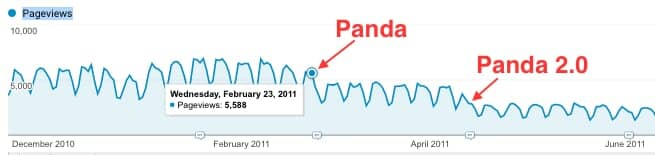
 I bought Digital Media Minute back in late 2008 from a web developer. He’d had added content virtually every day–sometimes multiple posts per day–since he started the site in 2003. When I bought DMM it had over 3000 posts on it, almost all of which were indexed in Google.
At the time the traffic was about 5,500 unique visits per day on weekdays, when most developers were at work and referring to the site for the answers to minor programming questions, or the sort of hacks that the former owner excelled at writing.
Probably a majority of the posts were less than 100 words in length, as again the site functioned as a repository of thousands of one developer’s professional notes to himself.
Some of the posts brought hundreds of visits each day, but Google loved even the less visited small ‘notes’– cumulatively they attracted a ton of long-tail traffic. Back then there was a place for a lot of sites like this, that aggregated answers like that, but it was not meant to last.
Panda and Penguin
In February 2011 the first Panda algo update hit Digital Media Minute badly, Panda 2.0 followed in April and things went from bad to worse. Penguin the following year didn’t hurt as much, but the traffic decline was pretty steady even outside of major algorithm updates.
It was all an education for me.
Proof that even with over a million backlinks, zero artificial linkbuilding, no duplicate content, on a responsive (albeit ugly!) WordPress theme, etc., a nicely aged site could be hit hard in such a way that even the 2,000-word posts that had formerly brought hundreds of visits each day were impacted too. Number-two or -three rankings for a keyword became second page rankings, then page four rankings…
The Road Ahead
After not touching this site for years, for the last few weeks I’ve been adding content, almost daily. I’m just writing about a couple of my hobbies: tech generally and Internet marketing. I’m supporting myself online by the way, and have for years. Client work and my own projects. Not too difficult in Bali, Indonesia, where (the good) life is still inexpensive and where I’ve had a base for 12 years now.
So yes–longer posts, just trying to be helpful or share genuine enthusiasm. Add an image with an alt tag, tweet out the URL to get it indexed a little faster, etc. Basic stuff.
It hasn’t been hard for me to get a post together each day, share opinions and small tips of my own, no longer programming tips but more in line with topics with which I have experience, especially Internet marketing.
But I’ve got a little plan.
There is very little to lose when it comes to Digital Media Minute. Worse case, well, not much will change frankly, in terms of revenue the site is earning (enough each month for a half a pizza in the US of A, or a week’s worth of lunches at my favorite warung here in Bali) or traffic, under 100 visits per day as we are now.
Best case, frankly any bump at all in traffic will be something of a victory as far as I’m concerned, and I’ll have some hard data I can share in an interesting case study.
My plan has a few parts to it, and I’ll get more ideas as I go, as one does.
Here’s what I’m planning at the moment:
This is a traffic generation challenge. Unlike in 2008, I won’t rely only on SEO to increase site traffic. But I still want to start by trying to increase traffic from search.
In 2011, post Panda, I added content to the posts that were literally a sentence or two, so that every post on this site had 100 words, minimum. Took dozens of hours. Of course these posts were still insanely thin, but maybe just a little less laughably thin than they had been. Clearly it didn’t change anything.
At the time I was considering radically culling the number of posts on the site, putting back to draft status all posts that had no backlinks, fewer than X amount of visits per month, and that had made zero or a few pennies income.
I didn’t do it at the time because I thought there might be a chance that things would somehow improve over time.
I no longer think that will happen. I think the thin pages are still hobbling the entire site, per my understanding of Panda.
I’ve also been swayed by the example of people like Brian Dean of Backlinko, who was doing incredibly well in the SERPs even when he had fewer than 20 (epic) posts on his site, and adding new content only once a month or so (if memory serves).
That is the opposite of what this site was built on, short posts and updates every day.
Brian Dean is number 1 or 2 for ‘onpage SEO‘. Traffic to this site is down by 98%.
In terms of strategy, I’m just not shooting for the super long tail traffic that used to be DMM’s bread and butter, as attracted by the short, specific posts I mentioned earlier. Fewer, longer posts are the way to go.
But first I will cut the number of posts on the site radically.
Over the course of the last year about 600 posts–out of 3000+ remember–received any traffic. In the last two years that number is under 1000.
I’ll cut out any post that hasn’t been visited in the last 2 years. I’ll 301 any backlinks these posts have to them.
Of the remaining 1000 posts, I’ll cut hundreds more. Only 600 posts have two or more visits in the last two years. 425 posts have 3 or more visits in the last two years. Only 338 have 4 or more. You get the idea.
I can’t see how I’m hurting things if I end up with only a few hundred posts on Digital Media Minute, and maybe a lot less than that.
I don’t expect to see a traffic explosion, of course! But we’ve heard anecdotes where doing this sort of thing can rather counter-intuitively increase traffic.
I do think it’s worth an experiment. Especially since the posts I ‘cut’ will be simply put back to draft status, not deleted.
After a few weeks–I’ll use one tactic at a time to see if it has any effect–I’ll put time into improving the remaining posts. I’ll select posts that rank at the bottom of page one or top of page two for their primary keywords, favoring primary KWs that have especially high search volume.
Then, if we’ve seen any improvement at all, I’ll work on branding and a new theme, and list building.
There’s a lot more to tell; I’ll elaborate further in an upcoming post.
Thanks for reading.
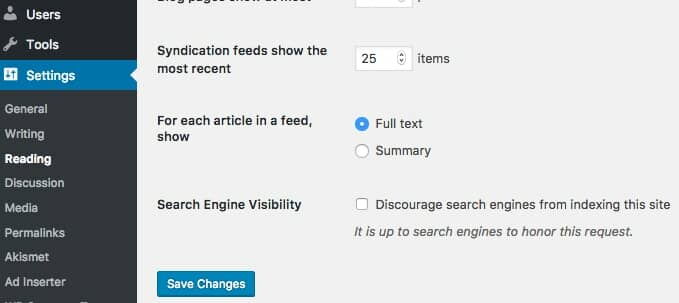
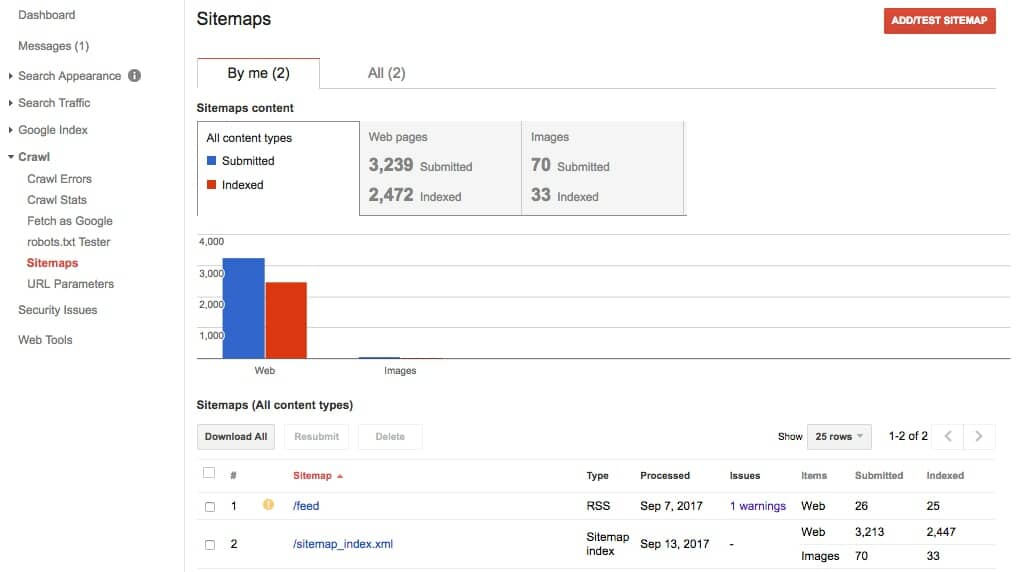 After you submit your sitemap it can still take some time to have your site show up. Check using the method above; enter the URL into Google. As long as you have the box ticked in your WordPress settings as I show you above, the crawlers will find you eventually if you’ve submitted your site to Google, added it to Google Search Console, and submitted a sitemap.